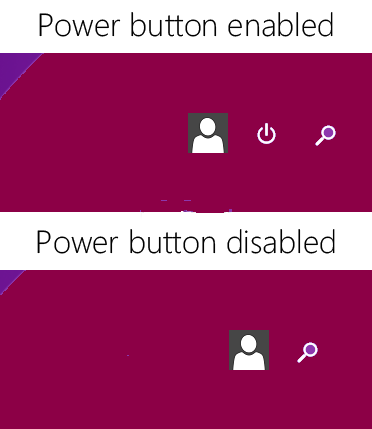
Microsoft has added the much awaited Power button on Start Screen. Now users can quickly and easily access power options such as shutdown, restart, hibernate, sleep, etc right from the Start Screen.
Now there might be people who want to remove this new Power button from Start Screen in their Windows 8.1 PCs or who want to add the new Power button in their Windows 8.1 tablets.
Here is a small Registry tweak which lets you enable/disable Power button on Windows 8.1 Start Screen.
1. Type regedit in RUN dialog box or Start Screen search box and press Enter. It'll open RegistryEditor.
2. Now go to following key:
HKEY_CURRENT_USER\Software\Microsoft\Windows\CurrentVersion\ImmersiveShell
3. Create a new key Launcher under ImmersiveShell key so the final key path would be:
HKEY_CURRENT_USER\Software\Microsoft\Windows\CurrentVersion\ImmersiveShell\Launcher

That's it. Log off or restart Windows Explorer as mentioned here and Power button will no longer present on Start Screen.
5. Similarly if you want to show or add Power button on Windows 8.1 touch-enabled devices such as Surface, etc, simply change the value of Launcher_ShowPowerButtonOnStartScreen to 1and the Power button will get added on Start Screen upon next login.
-----------------------------------------------------------------
Now there might be people who want to remove this new Power button from Start Screen in their Windows 8.1 PCs or who want to add the new Power button in their Windows 8.1 tablets.
Here is a small Registry tweak which lets you enable/disable Power button on Windows 8.1 Start Screen.
1. Type regedit in RUN dialog box or Start Screen search box and press Enter. It'll open RegistryEditor.
2. Now go to following key:
HKEY_CURRENT_USER\Software\Microsoft\Windows\CurrentVersion\ImmersiveShell
3. Create a new key Launcher under ImmersiveShell key so the final key path would be:
HKEY_CURRENT_USER\Software\Microsoft\Windows\CurrentVersion\ImmersiveShell\Launcher
4. Now in right-side pane, create a new DWORD
Launcher_ShowPowerButtonOnStartScreenand keep its value as 0
That's it. Log off or restart Windows Explorer as mentioned here and Power button will no longer present on Start Screen.
5. Similarly if you want to show or add Power button on Windows 8.1 touch-enabled devices such as Surface, etc, simply change the value of Launcher_ShowPowerButtonOnStartScreen to 1and the Power button will get added on Start Screen upon next login.
-----------------------------------------------------------------
Our ecommerce solutions are extremely
innovative and they would bring the best results for your business once you try
them in first hand. If you want a complete holistic ecommerce solution then
Techvedic is not too far away from you folks.
About Techvedic: http://en.wikipedia.org/wiki/Techvedic
Get in touch
with Techvedic on Social Media:
Techvedic Facebook
Page: https://www.facebook.com/techvedic
Techvedic Twitter:
https://twitter.com/techvedic
Techvedic Google
Plus Page:
https://plus.google.com/+TechvedicInc/posts
Techvedic YouTube:
https://www.youtube.com/user/Techvedic
Techvedic LinkedIn
Profile: https://www.linkedin.com/company/techvedic
Visit:
Techvedic – Customer Relationship Management | http://www.techvedic.co.in/ | 1
800 3000 1126 | support@techvedic.com


