Description
Low-battery issues can occur
anytime. And, the situation becomes worse when you don’t even have the charger
with you. Thus, this tutorial is helpful for you.
Solution:
For mobile users

If you want to increase your battery
life after charging then try to reduce your consumption. For this, you have to
use applications less by turning them off when not in need. The most important
thing that you can turn off is display by reducing the brightness. The GPS
circuitry and the real-time navigation software are the real power suckers. Try
to use it less. Other than this, Bluetooth, NFC, and Wi-Fi should also be used
very less to double your battery life. Moreover, avoid multitasking.
For Laptop users
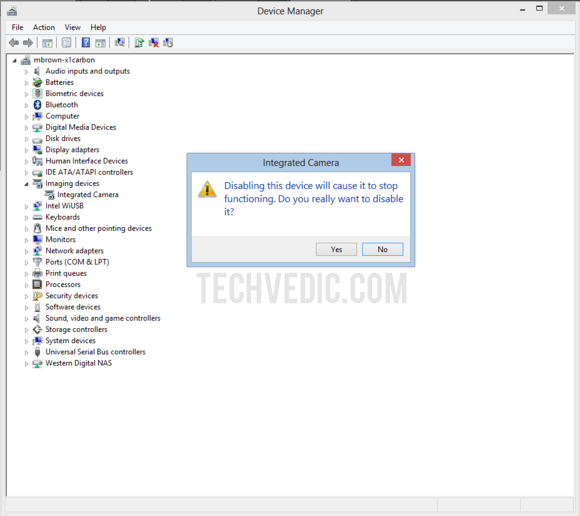
Talking about the laptop users, you
can do much more stuff to reduce battery drain including back-lit keyboards,
Firewire ports, Wi-Fi, sound and auxiliary video controllers, serial and com
ports, optical drive and web cams. By disabling a bunch of these devices, you
can save battery to certain extent. To disable any piece of hardware, type “device
manager" using the Windows find function and select the device you want to
enable or disable from the list. Don’t forget to close the unessential
background processes. This you can do by going to “Task manager”, select the
“processes” tab and check the process names and descriptions. In order to kill
any third-party process, you need to right-click over the program and select
“End Process Tree” from the options.

For boosting battery lifespan
There are some tricks to maximize
the lifespan of lithium-ion battery. Stop draining it to a maximum point and
plug it into charging before low battery warning comes up. Furthermore, avoid
leaving your Li-ion powered device in a hot car or near another heat source as
it can lessen its recoverable capacity. By doing this, you are reducing
four-hour run time to three hours. Also, using a touch charger is not a good
option as it can reduce your battery’s lifespan. Keeping chargers away from
other heat source doesn’t mean that you have to freeze them. Your battery needs
just 60 degree Fahrenheit.

Li-ion batteries have charge
controllers that can control overcharging and over-discharging. If you find
your charger or device overheated, stop using it. Always store a lithium-ion
battery at 60 degrees with somewhere around 40% charge.
For more from the XpertCrewTM
team, please follow us on Twitter @Techvedic or contact Techvedic’s computer support helpdesk, as per below contact-details:
U.S. +855-859-0057 (http://www.techvedic.com/ )
U.K. +800-635-0716 (http://www.techvedic.co.uk/ )
CA 1-855-749-5861 (http://www.techvedic.ca/)
AU 1-800-197-298
(http://www.techvedic.com.au/ )
And yes, we are eagerly waiting
for your valuable feedback. Do write us back. We would be more than happy to
help you. We are available 24/7.


